Renovate AI : House Design
- 4.6
- Rating
- 100.00K
- Installs
- Free
- Price

 Analysis by App-foxy
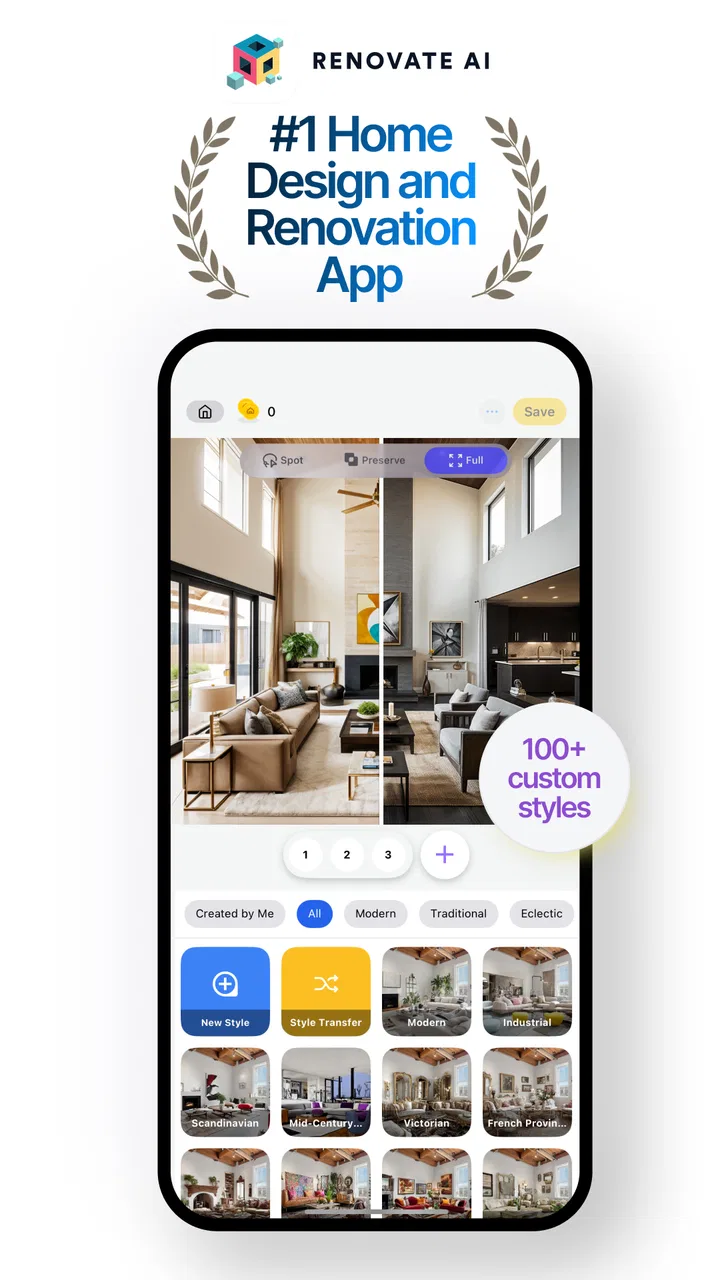
I like home-design apps most when they help me think clearly before I spend money, and Renovate AI: House Design takes that idea in an interesting direction. It is a free House & Home app from Trial & Error AI that uses artificial intelligence to explore interior design, room decoration, and renovation concepts. I found its main value in turning a vague idea such as “make this room warmer” into something visual that I could react to.
That sounds simple, but it changes the early stage of decorating. Instead of opening a furniture store, saving dozens of unrelated pictures, and trying to imagine how they might work together, I can begin with my own room and use the generated result as a conversation starter. It is best understood as a visual planning tool, not a replacement for measurements, product research, or a professional designer.
The app has built a noticeable audience, with a 4.4 average from around 2.9 thousand ratings and over 100 thousand installs. Those figures suggest that the concept is connecting with people, although they do not remove the need to judge the experience for yourself. I also paid attention to the less exciting questions: what control the user has, where personal images enter the process, and whether the results are practical rather than merely attractive.
You May Also Like

 Blood Strike: 2.5 Anniversary
Blood Strike’s Loadouts Turn Every Drop Into a Tactical Gamble
A close look at Blood Strike’s custom loadouts: how fast access to signature weapons reshapes its battle royale rhythm, rewards preparation, and narrows the gap between fights.

 Pandora - Music & Podcasts
Pandora’s Music Is Easy to Start, but Harder to Recover
Pandora’s strength is its low-effort path from a seed to a station. Its weak spot is how much confidence it asks you to place in connection, setup, and quiet recovery.

 8 Ball Pool
 Is Built on Rivalries, Rematches, and Routine
A close look at the rivalries, rematches, shared routines, and unanswered safety questions that turn a quick pool match into a persistent mobile community.

 Samsung Music
’s Quiet Strength Is Playing What You Already Own
Its reach comes less from spectacle than from dependable access to a personal library. That simplicity is both the app’s strongest retention engine and its ceiling.

 AccuWeather: Weather Radar
AccuWeather Review: A Quick, Clear Forecast for Everyday Decisions
For everyday plans, the best forecast is the one you can understand quickly. AccuWeather makes rain timing, radar, and local conditions easy to act on, with a few trade-offs.

 Hill Climb Racing
Why Hill Climb Racing Still Turns Crashes Into One More Run
A tiny car, a bumpy hill and one more upgrade: Hill Climb Racing keeps resurfacing because its simple chaos makes every near-miss feel personal.
More From Our News Desk
View All News


How Renovate AI fits into a real decorating project
I find this kind of project easier to manage when I decide what I need to learn before opening the app: whether a color direction suits the room, whether keeping a large piece of furniture still works, or whether a simpler look feels more livable. That small pause helps me judge each concept against a real decision, rather than collecting attractive images without a next step.
Starting with a room instead of a blank canvas
The most useful way I found to approach Renovate AI is to give it a specific job. “Redesign my home” is too broad. A better starting point is a living room that feels dark, a bedroom that needs calmer colors, or a small hallway where I want to test a lighter visual direction. The more clearly I define the problem in my head, the easier it is to judge the result.
This makes the app especially helpful before shopping. If I am considering a new sofa, paint color, rug, or lighting style, I can use the generated concept to ask whether the overall mood is moving in the right direction. I would not treat the image as proof that a particular item will fit. I would treat it as a quick visual experiment that helps me avoid buying something based only on imagination.
That distinction matters because AI room images can make a space look more finished than it really is. A rendered arrangement may appear balanced without showing the awkward doorway, radiator, low ceiling, narrow walkway, or storage problem that affects daily life. I therefore use the app to choose a direction, then return to ordinary measurements and product specifications before making a decision.
A practical weekend scenario
Imagine that I am refreshing a bedroom without replacing every piece of furniture. I could photograph the current room, decide that I want a softer and less cluttered feeling, and use the app to explore a few design approaches. One version might help me see whether lighter surfaces make the room feel more open. Another could show how a different decorative mood changes the effect of the same bed and flooring.
The useful outcome is not necessarily the most beautiful image. It may be the version that reveals what I do not want. Perhaps a strong accent wall makes the room feel smaller, or a heavily decorated style competes with the existing wardrobe. Discovering that before painting or ordering accessories is a genuine benefit.
I would then write down the decisions that survive the experiment: keep the existing bed, change the wall tone, reduce visual clutter, and add one warm material rather than several. This workflow prevents the app from becoming an endless gallery of attractive but disconnected ideas.
Where it differs from familiar alternatives
Traditional inspiration boards are excellent for collecting references, but they often show someone else’s room, lighting, and furniture. Renovate AI is more useful when I want to start from my own space and ask, “What if?” A conventional room planner, on the other hand, is usually stronger for exact layouts, dimensions, and furniture placement. A professional interior designer remains better when the project involves structural changes, complicated lighting, accessibility needs, or a large budget.
So the app occupies a middle ground. It is more personal than browsing generic pictures and more imaginative than a strict floor-plan tool, but it is not as dependable as a measured design plan. That trade-off is the reason I would recommend it for early decisions rather than final execution.
What the version and pricing mean in practice
Renovate AI is free to download and suitable for Everyone. Its current version is 4.4.73, and it requires Android 7.0 or later. That makes it accessible to many Android users, including people who are not using a recent phone. Still, compatibility is not the same as comfort: image-focused apps can feel less pleasant on a small or older display, so I would do serious comparisons on the largest screen available to me.
The app includes in-app purchases ranging from $4.99 to $99.99 per item. I would not assume that every useful option is included at no cost, and I would check the purchase screen carefully before confirming anything. The broad range means the financial side deserves attention, particularly if I am experimenting casually rather than working on an active renovation.
For a single room idea, I would first use the free experience to decide whether the visual approach is genuinely useful. I would only consider paying after identifying a repeated need, such as comparing several design directions for a real project. That keeps curiosity from turning into an accidental expense.
Trust begins with visible choices
Because the app works with room imagery and AI-generated design, I think about trust differently than I would with a simple calculator or notes app. A photo of a room can reveal more than furniture. It may show family pictures, documents, addresses, valuables, children, or views through windows. Before selecting an image, I would crop out anything unrelated to the design task.
I also prefer taking a deliberate photo rather than uploading a casual wide shot of the entire home. A close, well-framed image of the room gives the design system what it needs while reducing unnecessary personal context. This is one of the most practical privacy habits for using any image-based home-design service.
The important point is not to make assumptions about permissions or data handling. I look at the permission prompts, account screens, purchase confirmations, and any privacy information shown by the app and the platform. If a choice is optional, I keep it optional. If an explanation is unclear, I avoid sharing more than is necessary. Trust here should come from readable controls and careful user choices, not from the visual quality of a generated room.
Moments that deserve extra care
There are several points where I slow down. The first is image selection. I remove personal photographs from walls when possible and avoid including mail, screens, paperwork, or identifying details. The second is account setup. I read what the app asks for instead of rushing through every prompt, especially if signing in is presented alongside a guest-like path or a later option.
The third is payment. AI experimentation encourages repeated attempts, and repeated attempts can make a purchase feel more reasonable than it was at the beginning. I check the exact item, the amount, and whether the purchase is one-time or connected to an ongoing use pattern before proceeding. I also keep platform purchase controls available for anyone else who might use the device.
A fourth moment comes when sharing results. A generated room can still contain the original room’s recognizable layout or personal belongings. Before sending an image to friends, contractors, or social networks, I inspect it as carefully as I would inspect the original photograph. If the purpose is simply to discuss colors, a cropped section may be enough.
How much control do I really have?
The app is most satisfying when I use the output as a suggestion rather than an instruction. I remain in control of the decisions that matter: which room to work on, which image to provide, which style direction seems suitable, and whether any result is worth pursuing. That agency is important because AI can make a confident-looking proposal that does not match my habits or budget.
I would also keep a simple record of what each generated concept is trying to solve. For example, one image may be about color, another about reducing clutter, and another about changing the decorative mood. Without that note, it is easy to compare images emotionally and forget the original goal. This small habit makes the app more useful and reduces the temptation to chase whichever image looks most polished.
When a result feels wrong, I do not immediately conclude that the whole project is wrong. I ask whether the problem comes from the chosen style, the room photo, or an unrealistic expectation. A poor result may simply mean that the image includes too much background or that the requested transformation was too broad. Narrower experiments are easier to evaluate than one dramatic request to redesign everything.
Three less obvious ways I would use it
First, I would use the app to test restraint. Many decorating decisions fail because a room receives too many changes at once. I can compare a version with several new visual elements against one that changes only the wall treatment and textiles. If the simpler direction feels calmer, that is a useful answer even when the more elaborate image looks impressive.
Second, I would use it as a disagreement tool. If two people in a household have different ideas, a visual concept can turn an abstract argument into something concrete. Neither person has to accept the generated image as correct. It simply gives both of us a shared object to critique: too dark, too busy, too cold, or closer to the intended mood.
Third, I would use it to protect existing items from impulse replacement. Instead of assuming that an old cabinet must go, I can explore a broader room direction and see whether the cabinet becomes less distracting when the surrounding colors and accessories change. This can lead to a smaller, more affordable project and is a more thoughtful use of AI than asking for a completely new room every time.
Limitations I would not ignore
The central limitation is that visual plausibility is not the same as physical accuracy. I would never rely on a generated image to confirm that a sofa fits through a doorway, that a desk leaves enough clearance, or that a light fixture can be installed safely. Those questions belong to measurements, manufacturer information, building rules, and qualified professionals where appropriate.
The app can also encourage unrealistic expectations about consistency. A concept may capture a general mood while changing details that matter to me, such as the shape of furniture, the position of an opening, or the relationship between objects. If I need a faithful plan based on exact dimensions, a dedicated floor-planning application is the better tool.
There is also a creative limitation. AI suggestions can pull toward familiar, visually pleasing combinations. If I have a very personal style or need a highly specific cultural, practical, or accessibility-focused solution, browsing specialist references or speaking with a designer may produce better results. The app is strongest when I want possibilities, not when I already have a precise technical brief.
Finally, the purchase structure requires discipline. The free entry point is appealing, but the presence of individual in-app items means I should not treat every additional generation or option as automatically worthwhile. I would set a clear stopping point for each session and decide what real-world decision the next experiment is meant to support.
Who should try it, and who should choose something else?
I would recommend Renovate AI to renters, first-time decorators, homeowners gathering ideas, and anyone who struggles to imagine how a room might feel after a change. It is particularly useful for people who have a real room to photograph but do not yet have a clear style vocabulary. Seeing alternatives can make it easier to identify preferences that are difficult to describe in words.
I would be more cautious about recommending it to someone planning structural renovation, purchasing expensive custom furniture, or needing precise technical documentation. In those situations, a measured planner, an architect, an interior designer, or direct advice from a qualified professional is more appropriate. I would also suggest skipping it if the main goal is a shopping list with exact products, because a visual concept does not automatically solve sourcing.
People who are highly protective of interior photos should make a deliberate privacy decision before using it. That does not mean the app is unsuitable; it means the image workflow deserves the same care as sharing any personal photograph. Cropping, removing identifying details, reading prompts, and reviewing account and purchase choices are sensible steps.
My cautious verdict
After using Renovate AI as an idea generator, I see a clear reason to keep it available: it shortens the distance between a decorating thought and a visual conversation. I can test a mood, challenge my first idea, and discuss a room with another person without immediately buying paint or furniture. That is meaningful value for a free House & Home app.
At the same time, I would not let a polished result make decisions for me. Measurements, function, cost, durability, privacy, and installation still matter more than an attractive image. The app earns its place when I use it early, narrowly, and with a specific question in mind.
My recommendation is to try Renovate AI for low-risk visual exploration, while keeping control of images, account choices, and purchases. If you want inspiration grounded in your own room, it is worth exploring. If you need technical accuracy or a complete renovation plan, use it only as a first conversation and rely on a more precise alternative for the final work.
Trial & Error AI has made a tool that feels approachable for everyday decorating decisions, and the app’s broad audience reflects that accessibility. My final view is positive but measured: Renovate AI: House Design is most valuable when it helps me think better, not when I mistake its suggestions for certainty.
FAQs for Renovate AI : House Design
01What features does Renovate AI: House Design offer?
Renovate AI: House Design provides a wide range of features for home design enthusiasts. Users can explore virtual room designs, utilize AI-powered tools for layout suggestions, and access a library of furniture and decor options. The app also allows for 3D visualization, helping users to see their designs in a realistic setting before making any changes.
02Is Renovate AI: House Design user-friendly for beginners?
Yes, Renovate AI: House Design is designed with user-friendliness in mind. The interface is intuitive, making it easy for beginners to navigate. Step-by-step tutorials and helpful tips are available within the app to guide new users through the design process, ensuring they can create beautiful spaces without prior experience.
03Can Renovate AI: House Design be used offline?
Renovate AI: House Design requires an internet connection for initial setup and to access the full library of design elements. However, once your project is downloaded, you can work on it offline. This allows users to continue designing without interruption, though some features may be limited without connectivity.
04Are there customization options available in Renovate AI: House Design?
Absolutely, Renovate AI: House Design offers extensive customization options. Users can personalize color schemes, materials, and textures to fit their unique style preferences. The app also supports custom furniture and decor uploads, allowing for a truly tailored design experience that reflects individual tastes and requirements.
05Does Renovate AI: House Design offer a free trial or subscription model?
Renovate AI: House Design operates on a freemium model. Basic features are available for free, while premium tools and assets require a subscription. The app often provides a free trial of the premium version, allowing users to explore advanced features before committing to a subscription, ensuring it meets their design needs.
Pros
- User-friendly interface for easy navigation.
- Wide range of design templates available.
- High-quality 3D visualization tools.
- Regular updates with new features.
- Offline mode for designing without internet.
Cons
- Limited free features; many locked behind paywall.
- Occasional lag on older devices.
- Ads can be intrusive at times.
- Requires significant storage space.
- No export option for non-premium users.

Renovate AI : House Design
Gallery